PHP – HTML5
PHP
Starting with PHP 5, the object model was rewritten to allow for better performance and more features. This was a major change from PHP 4. PHP 5 has a full object model.
features in PHP 5 are the inclusions of visibility, abstract and final classes and methods, additional magic methods, interfaces, cloning and typehinting.
PHP treats objects in the same way as references or handles, meaning that each variable contains an object reference rather than a copy of the entire object. See Objects and References
Features
Visibility : The visibility of a property or method can be defined by prefixing the declaration with the keywords public, protected or private.
HTML
How do you improve the performance of a website.
- code unification :Each CSS file must be loaded before the page can be displayed in an internet browser.
- compress css and javascript files:We can compress a CSS file by removing unnecessary spaces, comments,
- Using sprite images instead of multiple images
- Always put javascripts at the bottom of the page.
What is bootstrap ?
Bootstrap is CSS framework for developing responsive, mobile first projects on the web. Current version of bootstrap is v3.3.6. Bootstrap also comes with two preprocessors: less and saas.
Bootstrap uses 12 column grid system. Bootstrap’s grid system is responsive, and the columns will re-arrange depending on the screen size
What new features has been added in bootstrap 3?
- New Glyphicons icon font!
- Smallest file size.
- New grid system.
- its uses CSS compressors (Less/Saas)
Difference between container and container-fluid in bootstrap?
.container has a max width pixel value, whereas .container-fluid is max-width 100%.
.container-fluid continuously resizes as you change the width of your window/browser by any amount.
.container resizes in chunks at several certain widths, controlled by media queries (technically we can say it’s “fixed width”
because pixels values are specified, but if you stop there, people may get the
impression that it can’t change size – i.e. not responsive.)
Tell me latest jquery version ?
Latest version of jquery is V-3.1.0 (11-8-2016)
Difference between html5 tag and normal tag ?
HTML5 tag are called as semantic tags.
A semantic element clearly describes its meaning to both the browser and the developer.
<article>
<aside>
<details>
<figcaption>
<figure>
<footer>
<header>
<main>
<mark>
<nav>
<section>
<summary>
<time>
Difference between live and bind function in jquery.
The bind() method attaches one or more event handlers for selected elements, and specifies a function to run when the event occurs.
The live() method was deprecated in jQuery version 1.7, and removed in version 1.9. Use the on() method instead.
Some new fautures of css3?
- border-radius (border-radius: 25px;)
- box-shadow (box-shadow:3px 3px 3px 2px #797979;)
- Text Shadow ( text-shadow: #aaa 2px 2px 2px;)
- Multiple Backgrounds
.container {
/* fallback */
background: url(image/bg1.png) no-repeat;
/* modern browsers */
background: url(image/bg1.png) 0 0 no-repeat,
url(image/bg2.png) 100% 0 no-repeat;
}
- Transition
We can add animation to an element using transition. We need to specify these parameters.
- transition-property
- transition-duration
- transition-timing-function
- transition-delay
div {
width: 150px;
height: 150px;
background: red;
/* For Safari 3.1 to 6.0 */
-webkit-transition-property: height;
-webkit-transition-duration: 2s;
-webkit-transition-timing-function: ease-in-out;
-webkit-transition-delay: 1s;
/* Standard syntax */
transition-property: height;
transition-duration: 2s;
transition-timing-function: linear;
transition-delay: 1s;
}
what is closest in jquery ? What’s the difference between .closest() and .parents(‘selector’)?
.closest() method begins its search with the element itself before progressing up the DOM tree, and stops when current element matches the selector.
.parents() Begins with the parent element, get the parent of each element in the current set of matched elements
What is json?
JSON stands for JavaScript Object Notation. JSON is language independent, lightweight data interchange format. JSON data is written as key value pairs.
Eg :”name”:”Selva”
Explain position property in css?
The CSS positioning properties allow you to position an element. There are four different positioning methods: Static, Fixed, relative, absolute.
Difference between $(this) and this in jquery?
Keyword ‘this’ is a native DOM element. $(this) is a jQuery object that allows you to call functions such as .addClass() on it.
Will HTML5 canvas supported in IE ?
HTML5 canvas is not supported in IE version less than 9. ExplorerCanvas(excanvas) a JS library is the option to render HTML5 canvas for IE6, 7, and 8.
what is jsonp?
JSONP is nothing but JSON with padding. JSONP is mostly used in RESTFull APIs(Cross domain request). JSONP is a simple trick to overcome XMLHttpRequest same domain policy. (As you know one cannot send AJAX (XMLHttpRequest) request to a different domain.). JSONP request appends the callback function with URL. Eg: http://www.abcs.com/example.php?callback=simplecallback
Whenever the server receives the callback it will return the data. The data can be accessed using that call back function.
A simple implementation of JSONP request.
//
(function() {
var flickerAPI = “http://api.flickr.com/services/feeds/photos_public.gne?jsoncallback=?”;
$.getJSON( flickerAPI, {
tags: “mount rainier”,
tagmode: “any”,
format: “json”
})
.done(function( data ) {
$.each( data.items, function( i, item ) {
$( “” ).attr( “src“, item.media.m ).appendTo( “#images” );
if ( i === 3 ) {
return false;
}
});
});
})();
// ]]>
How do you create a simple plugin in jquery?
Sample plugin creation code is given below:
(function($){
$.fn.showLinkLocation = function() {
return this.filter(‘a’).each(function(){
$(this).append(
‘ (‘ + $(this).attr(‘href’) + ‘)’
);
});
};
}(jQuery));
// Usage example:
$(‘a’).showLinkLocation();
List out some CSS Frameworks for creating responsive templates?
Bootstrap
-> Bootstrap is mobile first framework. It includes predefined classes for easy layout options, as well as powerful mixins for generating more semantic layouts.
Foundation 3
-> Foundation 3 is built with Sass, a powerful CSS preprocessor. “Pricing Tables” is an interesting componenet in foundation 3. Pricing tables are suitable for marketing site for a subscription-based product. It also offers super cool features like Right-to-left text direction support.
Skeleton
Skeleton is a small collection of CSS files that can help to rapidly develop sites that look beautiful at any size, be it a 17″ laptop screen or an iPhone.
YAML 4
YAML 4 is built on SAAS. You can check the documentation in the above link.
ResponsiveAeon
Responsive Aeon is a simple, fast, Intuitive css framework. It contains almost 120 lines of code and only 1kb minified.
What is the difference between canvas and svg?
<canvas> is an HTML element which can be used to draw graphics using JavaScript. This can be used to draw graphs, create animations etc.
The <canvas> element is not supported in older browsers, but is supported in recent versions of all major browsers.
The default size of the canvas is 300 px × 150 px (width × height). But custom sizes can be defined using the HTML height and width property. The declaration is as follows.
<canvas id=”animate” width=”250″ height=”250″></canvas>
SVG stands for Scalable Vector Graphics (SVG) is based on XML markup language, for describing 2D vector graphics.
Can you explain the difference between cookies, sessionStorage and localStorage.?
LocalStorage stores data with no expiration date, and gets cleared only through JavaScript, or clearing the Browser Cache / Locally Stored Data – unlike cookie expiry.
Local storage and session storage are perfect for non sensitive data. The data stored in localStorage and sessionStorage can easily be read or changed from within the client/browser
so should not be relied upon for storage of sensitive or security related data within applications.
Data stored in the SessionStorage is only available for the duration of the browser session (and is deleted when the window is closed) – it does however survive page reloads.
In cookie, we can store 4096 bytes of data. Data stored in the cookie can be hacked by the user, unless the site uses SSL. We can also prevent injections like Cross-Site Scripting (XSS)/Script injection using httponly in the header.
Explain about quirks mode?
There are three modes used by the layout engines in web browsers: quirks mode, almost standards mode, and full standards mode.
Quirks mode is turned on when there is no correct DOCTYPE declaration, and turned off when there is a DOCTYPE definition.
However, invalid HTML – with respect to the chosen DOCTYPE – can also cause the browser to switch to quirks mode.
What is meant by hardware acceleration?
It means the graphical rendering is done on dedicated hardware (your GPU / graphics card) rather than your CPU. Hardware acceleration generally produces more fluid animation.In general you should always enable hardware acceleration as it will result in better performance of your application.
This will usually be a higher frame rate (the number of images displayed per second), and the higher the frame rate, the smoother the animation.
How can you load css resources conditionally?
Using CSS media querises we can load CSS contidionally. If you want to load the stylesheet for the device less than 600px, then you can declare as below.
<link rel=”stylesheet” media=”screen and (min-width: 600px)” href=”small.css”>
This style sheet will only load for screen size less than 600px.
Difference between article and section tag in HTML5. How can you nest them in your document?
The section element represents a generic section of a document or application. A section, in this context, is a thematic grouping of content, typically with a heading.
So basically the section element should contain related information bunched under a common heading.
The HTML5 <article> element represents a complete composition in a web page or web application that is independently distributable or reusable, e.g. in syndication.
This could be a forum post, a magazine or newspaper article, a blog entry, a user-submitted comment, an interactive widget or gadget, or any other independent item of content.
We can nest article inside a section tag and vice versa. This is completely legal interms of HTML5.
What happen when you dont use doctype?
When omitted, browsers tend to use a different rendering mode that is incompatible with some specifications.
Also HTML5 tags such as < article >,< footer >, < header >, < nav >, < section > may not be supported if the Doctype is not declared.
What are data- attributes good for?
The data-* attributes is used to store custom data related to the page or application.The custom data can be used in JavaScript to complete events or animations.
Which set of definitions, HTML attributes or CSS properties, take precedence?
CSS properties take precedence over HTML attributes. If both are specified, HTML attributes will be displayed in browsers without CSS support but won’t have any effect in browsers with CSS support.
How do I eliminate the blue border around linked images?
in your CSS, you can specify the border property for linked images:
a img { border: none ; }
However, note that removing the border that indicates an image is a link makes it harder for users to distinguish quickly and easily which images on a web page are clickable.
Explain about HTML5 local storage ?
There are two ways to store data in HTML as objects locally :
- localStorage – store data across session acess
- sessionStorage – storing data for current session only
Data will be stored in key/value pair format.
example:
localStorage.empid=”420″;
sessionStorage.companyname = “Thiruvarur info tech ”;
explain CSS media queries ?
CSS media queries are used to develop responsive templates for different layout of screen, print, mobile , tablet or any other resolutions
CSS media queries can be added in 3 ways as like CSS style sheet :
Internal stylesheet : <style type=”text/css”>
@media only screen and (max-width: 600px){
/* rules apply to the device resolution is 480px or less */
}
</style>
Imported stylesheet : @import “tablet.css” (min-width: 800px) and (max-width: 1200px);
External stylesheet: <link rel=”stylesheet” type=”text/css” href=”deskto.css” media=”screen and (min-width: 1200px), print and (min-resolution: 300dpi)” />
explain css inheritance ?
Inheritance propagates property values from parent elements to their children. The inherited value of a property on an element is the computed value of the property on the element’s parent element. For the root element, which has no parent element, the inherited value is the initial value of the property.
<div class=”firstClass secondClass thirdClass fourthClass ” > </div >
what is javascript inheritance ?
In simple terms, inheritance is the concept of one thing gaining the properties or behaviours of something else.
Inherited children inherit their parent’s behaviour To say A inherits from B, is saying that A is a type of B.
In JavaScript You must use a special object called prototype.
function Animal() {}; // This is the Animal *Type*
Animal.prototype.eat = function () {
alert(“All animals can eat!”);
};
function Bird() {}; // Declaring a Bird *Type*
Bird.prototype = new Animal(); // Birds inherit from Animal
Bird.prototype.fly = function() {
alert(“Birds are special, they can fly!”);
};
The effect of this is that any Birds you create (called an instance of Bird) all have the properties of Animals
var aBird = new Bird(); // Create an instance of the Bird Type
aBird.eat(); // It should alert, so the inheritance worked
aBird.fly(); // Important part of inheritance, Bird is also different to Animal
var anAnimal = new Animal(); // Let’s check an instance of Animal now
anAnimal.eat(); // Alerts, no problem here
anAnimal.fly(); // Error will occur, since only Birds have fly() in its prototype
explain javascript associative array ?
Associative arrays are where we can associate a key string with a value string
JavaScript objects are also associative arrays.
i.e the property emp.Name can also be read by calling emp[‘Name’]
We can access each property by entering the name of the property as a string into the array
it refers to accessing the DOM elements of HTML also [as object or associative array]
explain JS Namespace ?
Namespacing is a technique employed to avoid collisions with other objects or variables in the global namespace
and also helps to organize blocks of functionality into easily manageable groups that can be uniquely identified.
JavaScript doesn’t builtin support of namespacing but using objects and closures we can achieve a similar effect.
javascript Namespacing patterns :
1) Single global variables :
var myApplication = (function(){
function(){
/*…*/
},
return{
/*…*/
}
})();
2) Object literal notation :
var myApplication = {
getInfo:function(){ /**/ },
// we can also populate our object literal to support
// further object literal namespaces containing anything
// really:
models : {},
views : {
pages : {}
},
collections : {}
};
3) Nested namespacing :
var myApp = myApp || {};
// perform a similar existence check when defining nested
// children
myApp.routers = myApp.routers || {};
myApp.model = myApp.model || {};
myApp.model.special = myApp.model.special || {};
// nested namespaces can be as complex as required
4) Immediately-invoked Function Expressions :
// an (anonymous) immediately-invoked function expression
(function(){ /*…*/})();
// a named immediately-invoked function expression
(function foobar(){ /*..*/}());
// this is technically a self-executing function which is quite different
function foobar(){ foobar(); }
5) Namespace injection :
// define a namespace we can use later
var ns = ns || {}, ns2 = ns2 || {};
// the module/namespace creator
var creator = function(val){
var val = val || 0;
this.next = function(){
return val++
};
this.reset = function(){
val = 0;
}
}
creator.call(ns);
// ns.next, ns.reset now exist
creator.call(ns2, 5000);
// ns2 contains the same methods
// but has an overridden value for val
// of 5000
Type of webservice ?
there are two types of web service….1. SOAP [Simple Object Access Protocol] Webservice and 2. RESTful [REpresentational State Transfer] Webservice.
SOAP is a messaging protocol , REST is a design philosophy , not a protocol.
SOAP:
you define your interface in a .wsdl file, which describes exactly which input parameters are expected and how the return values will look like
there are tools to generate the .wsdl files out of java class hirarchies. JAXB for example
there are also tools to generate java objects/classes as part of eclipse for example (don’t know the name in the moment).
SOAP is very strict. Every request is validatet against the wsdl before processing.
A good but not so easy to start with framework for SOAP WS is Apache CXF
REST: (no hands on experience up to now, feel free to correct and improve 😉 ):
a way to access a webserver or web application to retrieve data from or send to it.
it’s only negotiated, how it is accessed.
common is something like this http://server.domain.com/app/type/id=123 to retrieve object of type type with id=123 very intuitive, but no automatic validation of requests.
The main advantages of REST web services are:
- Lightweight – not a lot of extra xml markup
- Human Readable Results
- Easy to build – no toolkits required
SOAP also has some advantages:
- Easy to consume – sometimes
- Rigid – type checking, adheres to a contract
- Development tools
What is namespacing?
In many programming languages, namespacing is a technique employed to avoid collisions with other objects or variables in the global namespace. They’re also extremely useful for helping organize blocks of functionality in your application into easily manageable groups that can be uniquely identified.Namespacing Fundamentals
- Single global variables
- Object literal notation
- Nested namespacing
- Immediately-invoked Function Expressions
- Namespace injection
Single global variables
One popular pattern for namespacing in JavaScript is opting for a single global variable as your primary object of reference. A skeleton implementation of this where we return an object with functions and properties can be found below:
var myApplication = (function(){
function(){
/*…*/
},
return{
/*…*/
}
})();
Object literal notation
Object literal notation can be thought of as an object containing a collection of key:value pairs with a colon separating each pair of keys and values. It’s syntax requires a comma to be used after each key:value pair with the exception of the last item in your object, similar to a normal array.
var myApplication = {
getInfo:function(){ /**/ },
// we can also populate our object literal to support
// further object literal namespaces containing anything
// really:
models : {},
views : {
pages : {}
},
collections : {}
};
One can also opt for adding properties directly to the namespace:
myApplication.foo = function(){
return “bar”;
}
myApplication.utils = {
toString:function(){
/*..*/
},
export: function(){
/*..*/
}
}
- Nested namespacing
- Immediately-invoked Function Expressions (IIFE)s
- Namespace injection
- Explain about css specificity
- what is the use of box shadow and tell me the syntax.
- how to acheive rounded corners in css3.
- How will you improve the performance of a website.
- What is the use of sprite images.
- What are the different font formats and how will you include in your css stylesheet.
- What is responsive web page layout.
- What is fluid layout and advantages of it ?
- What do you know about css animations. Will you do css3 animation if we give google access?
- what are the css frameworks you know. have you ever used any css frameworks like LESS SAAS?
- Difference between HTML4 and HTML5?
- What is the use of canvas ? have you ever used it.
- What is the main difference between canvas and svg?
- What are semantic tags in html5. What is the main advantage of it.
- How will you add a jquery to your page.
- What is the diiference between javascript and jquery?
- Tell me the difference between document.ready and onload function in jquery?
- how can u apply css in jquery?
- Can you dynamicaaly add a div using jquery ?
- What are filters in jquery?
- What is an anonymous function in jquery and how will you define it?
- Have you ever heared about MVC in javascript?
- Javascript or Jquery which is faster ?
- How can you animate using Jquery?
- Tell me the use of is() , eq() methods in jquery?
- Why we use index() method in jquery.
- Tell me jquery.noConflict() method.
- Have you ever contributed any plugin?
- Tell me what are the Jquery UI you know. And how can you customize them.?
Back to Yuvan Shankar Raja
Solli Tholaiyen Ma Lyrics From Yakkai
Movie : Yakkai
Song : Solli Tholaiyen Ma Lyrics
Music : Yuvan Shankar Raja
Singer : Dhanush
Lyrics : Vignesh Sivv
Kaana Poona Kadhala
Naana Kenji Kekkuren
Poona Poguthu Kadhala
Solli Tholiyen Ma
Veena Neram Poguthu
En Maanam Kappal Erudhu
Thaana Vandhu Kaadhala
Solli Tholaiyen Ma
Nee Ok Solli Tholanja
Thara Kuthu Poduven
Illa Venam Solla Thuninja
Solo Song ah Paduven
Unakku Wait Panni
En Body Weak Aaguthu
Basement Shake Aguthu
Heart-u Break Aguthu
Loveahh Sollaathathaale
Nenju Lock Aaguthu
Current Illatha
Oor Pola Dark Aguthu
Vaaram Onnula
Kanavula Vandha
Vaaram Rendula
Manasulla Vandha
Moonam Varame
Rathathilayum Neethan
Ada En Maa En Maa
Nalla Pakkura
Koocha Padamanee
Nalla Illikira
Loveh Solla Mattum
Yenma Moraikkura
Sariye Illamaa
Ada Poo Ma Poo Maa
No No Summa Sonnenamma
Unakkaga Poranthavan
Nan Mattum Thanma
Un Kooda Vazhave
Thinam Thorum Saguren
Kaapathu Kadhala
Solli Tholaiyenma
Poona Poguthu Kadhala
Solli Tholiyen Ma
En Body Weak Aaguthu
Basement Shake Aguthu
Heart-u Break Aguthu
Loveahh Sollaathathaale
Nenju Lock Aaguthu
Current Illatha
Oor Pola Dark Aguthu
PHP Access Modifiers
PHP access modifiers are used to set access rights with PHP classes and their members that is the functions and variables defined within the class scope. In PHP, there are some keywords representing these access modifiers. These keywords will be added with PHP classes and its members.
PHP keywords as Access Control Modifiers
Now, let us have a look into the following list to know about the possible PHP keywords used as access modifiers.
- public – class or its members defined with this access modifier will be publicly accessible from anywhere, even from outside the scope of the class.
- private – class members with this keyword will be accessed within the class itself. It protects members from outside class access with the reference of the class instance.
- protected – same as private, except by allowing sub classes to access protected super class members.
- abstract – This keyword can be used only for PHP classes and its functions. For containing abstract functions, a PHP class should be an abstract class.
- final – It prevents sub classes to override super class members defined with final keyword.
Access modifiers Usage with PHP Classes, Class Members
Based on the possibility of applying the above list of PHP access modifiers, we can classify them. The following tabular column specify which keyword could be applied where in classes,functions or methods.
| Access modifier | classes | functions | variable |
| public | Not Applicable | Applicable | Applicable |
| private | Not Applicable | Applicable | Applicable |
| protected | Not Applicable | Applicable | Applicable |
| abstract | Applicable | Applicable | Not Applicable |
| final | Applicable | Applicable | Not Applicable |
public Access Modifier
Before introducing access modifiers in PHP, all classes and its members are treated aspublic by default. Still, for PHP classes without specifying any access modifiers, then it will be treated as public.
If we specify public,private or protected for a PHP class, then it will cause parse error. For example, if we define a class as,
public class  {
...
...
}
Then, the following parse error will be displayed to the browser.
Parse error: syntax error, unexpected 'public' (T_PUBLIC) in ...
Similarly, class functions without any access modifiers, will be treated as public functions. But, it is good programming practice to specify those functions as public for better understanding.
Unlike PHP classes and functions, we need to specify access modifiers for PHP class variables explicitly. For example, the following code is invalid, which will cause PHP parse error.
class Books {
$categories = array("puzzles","pull back","remote","soft");
...
}
And, the valid code for defining classes with public variables are follows.
class Books {
public $categories = array("puzzles","pull back","remote","soft");
...
}
private Access Modifier
We can state this keyword only for class variables and function, but not for class itself, as like as public modifier. PHP class members defined as private cannot be accessed directly by using its instance. For example,
class Books {
private $categories = array("puzzles","pull back","remote","soft");

public function getbooksCategories() {
return $this->categories;
}
}
$objbooks = new Books();
print "<pre>";
print_r($objbooks->categories); // invalid
print_r($objbooks->getbooksCategories());
print "</pre>";
In the above program, Books class contains an private variable and a public function. Accessing this private variable by using Books class instance with the line,
print_r($objbooks->categories); // invalid
will cause PHP fatal error as,
Fatal error: Cannot access private property Books::$categories in ...
But we can access class private variables via any public function of that class. In the above program we are getting the elements of $categories array variables via getbooksCategories() function defined as public.
Note that, all members of a class can be access within the class scope by using $this variable.
protected Access Modifier
This keyword is used in a PHP program which is using PHP inheritance. And, it is used to prevent access for PHP classes and its members from anywhere, except from inside the class itself or from inside its subclasses.
With this keyword, PHP classes and its members functions cannot be access directly from outside the classes and their subclasses, with the references of their instance.
Consider the following PHP program.
<?php
class Books {
protected $categories = array("puzzles","pull back","remote","soft");
protected $books = array(array("name"=>"Mechanical books","category"=>"pull back"),
array("name"=>"Jigsaw","category"=>"puzzles"),
array("name"=>"HiTech","category"=>"mech"),
array("name"=>"Teddy","category"=>"soft"),
array("name"=>"Baby","category"=>"soft"),
array("name"=>"Chinese","category"=>"puzzles"),
array("name"=>"Electronic","category"=>"remote"));
protected function getBooks() {
for($i=0;$i<count($this->nooks);$i++) {
$books_list[] = $this->books[$i]["name"];
}
return $books_list;
}
protected function getBooksByCategory($category) {
for($i=0;$i<count($this->books);$i++) {
if($this->books[$i]["category"]==$category)
$books_list[] = $this->books[$i]["name"];
}
return $books_list;
}
}

class SoftBooks extends Books {
protected $category = "soft";
function getBooks() {
return $this->getBooksByCategory($this->category);
}
}

$objBooks = new Books();
$objSoftBooks = new Softbooks();
print "<pre>";
/**Invalid
print_r($objBooks->categories);
print_r($objSoftBooks->categories);
print_r($objBooks->getBooks());*/
print_r($objSoftBooks->getBooks());
print "</pre>";
?>
Google Introduces Search Engine Apps : Springboard

Springboard is designed and marketed towards business and enterprise users of Google’s productivity apps — particularly those that have to regularly sort and search through large numbers of documents and files.
Within the same announcement Google also announce a significant upgrade to Google Sites, which is a tool designed by the company for creating web pages. The update will allow users to easily pull in information from other Google apps, and features all fully responsive designs for all of its layouts.
Both Springboard and the upgrade to Sites are currently being tested amongst a select group of users in Google’s early adopter program. If you’re interested in getting an early look at Springboard you can sign up here. An official public release date was not mentioned in the announcement.
Overview of HADOOP
When we look into the structure of this framework , we find that it is divided into HDFS and MapReduce.
The two hands of Hadoop framework
i.e. HDFS and MapReduce are Hadoop Distributed File System- the storage hand and the processing hand respectively. This skeleton divides the total data into smaller blocks and circulate them in assemblage through the junctions called nodes in the network. The JAR is sent to the nodes where the data needs to be worked on. Here the nodes responsible for those data residing near them work faster in transferring them.

Hadoop carries four programs of study.
They are :
-> Hadoop Common
-> HDFS
-> Hadoop YARN
-> Hadoop MapReduce
1. Hadoop common acts as the information centre that contains the collections of Hadoop libraries.
2. HDFS is the storage part of high band of frequencies.
3.The YARN organizes the properties that line up the user’s function in an assemblage.
4.MapReduce is the processor that processes all sets of data.
Hadoop is such a frame that can store and circulate huge data files without minimum error. Hence it is highly scalable.
1.This software costs very less for storing and performing computations on data in comparison with the traditional databases.
2.Accessing with different kinds of business solution data is done by Hadoop with ultimate comfort. It has been proving to be its best in decision making.
3.It helps in social media, emailing, log processing, data warehousing, error detection etc.
4. Since it maps the data wherever it is placed so Hadoop takes very less time in order to unfold any data. It hardly takes an hour to work on large petabytes of data. Hene, it is super fast.
Hence, the companies using Hadoop are able to gain far better insights. Whenever a data block goes from one node to another in the assemblage of the network, each block gets copied to each node and even if the data is lost, we will always be having a backup copy of it. Hence, fault occurrence is really very low.
Retrieving Google Analytics Data to Build a KPI Dashboard
Introduction
As we all know, many web projects are created in order to solve particular business needs. Any business requires data on how well it is going, how big the traffic of clients is, how many clients register, etc..
Google Analytics is an industry standard service to collect such data. The site webmaster puts a JavaScript tracker script in the pages to allow Google Analytics to collect the data for every time a page is loaded.

All that is done on front-end site, no PHP code is involved. In this article I cover retrieving access statistics data from Google Analytics using PHP.
Retrieving Google Analytics Data to Build a KPI Dashboard
Project owners and investors might need a dashboard or KPI progress page. Let’s see how to grab statistics from your Google Analytics account to s PHP backend in order to build a dashboard.
There are many statistics that represent the heartbeat of your project: number of visitors, bounce rate, percent of registrations, profit from every user, etc. These are called KPIs: the key performance indicators, each of which is a business metric used to evaluate factors that are crucial to the success of an organization.
KPIs differ from one company to another. Some of these indicators can be seen in original Google Analytics reports: how many people came and how engaged they are in average. What your customer might want is to combine that data with revenue and profit data from your database and build a solid dashboard.
At this point you will realize that you need to retrieve Google Analytics data from your PHP scripts.
Hold on, Google Analytics is a complex data source, —entries can be queried by date and name.
You will find an couple of classes below that help to automate interaction with this service and return a simple number as result of your query. The code is based on Zend Framework 1, since it helps a lot to automate interaction with Google services (a technology called GData).
First, let’s create an abstract class to help us create classes to work with different Google Services (just replace XXX with your app or library name)
<?php

class XXX_Google_Wrapper_Abstract {

    public $gdClient;

    protected $_listFeedsUrl;
    protected $_dataUrl;

    /**
     * Constructor for the class. Takes in user credentials and
     * generates the the authenticated client object.
     *
     * @param  string $email    The user's email address.
     * @param  string $password The user's password.
     * @return void
     */
    public function __construct( $email, $password, $service) {
        $client = Zend_Gdata_ClientLogin :: getHttpClient( $email, $password, $service);
        $this->gdClient = new Zend_Gdata( $client );
    }

    protected function __fetch($url) {
        $query = new Zend_Gdata_Query($url);
        $feed = $this->gdClient->getFeed($query);
        return $feed;
    }

    public function listFeeds() {
        return $this->__fetch($this->_listFeedsUrl);
    }

    public function fetchItems(array $params) {
        $url = $this->_dataUrl . '?' . http_build_query($params);
        return $this->__fetch($url);
    }
}
Now, we can use this parent class to create a class to work with Google Analytics:
<?php

class XXX_Google_Wrapper_Analytics extends XXX_Google_Wrapper_Abstract {
    protected $_listFeedsUrl = 'https://www.google.com' . '/analytics/feeds' . '/accounts/default';
    protected $_dataUrl = 'https://www.google.com' . '/analytics/feeds/data';

    public function __construct( $email, $password) {
        parent::__construct( $email, $password, 'analytics');
    }
}
Both classes must be placed anywhere where your scripts can automatically load them. Zend Framework provides a simple naming convention to make it work automatically.
Google Analytics data is very flexible — e.g., you can grab total visits count, or visits of a page that contains a particular keyword in its URL. So we need one more abstract class, that we will use our Google Analytics wrapper to access any kind of required data:
<?php
abstract class Stats_Google_Analytics_Abstract {
    protected static
        $_wrapper,
        $_reportID;
    protected $_page;

    public function __construct() {

        if (!empty(self::$_wrapper)) return true;

        $config = Zend_Registry::get( 'config' ) -> toArray();
        $analyticsConfig = &$config[ 'google' ][ 'analytics' ];

        $email    = $analyticsConfig['email'];
        $password = $analyticsConfig['password'];
        self::$_reportID = $analyticsConfig['report']['id'];

        try {
            self::$_wrapper = new Sunny_Google_Wrapper_Analytics( $email, $password);
        }
        catch(Zend_Gdata_App_AuthException $e) {
            error_log( 'Zend_Gdata_App_AuthException: ' . $e->getMessage() );
            throw $e;
        }
    }

    public function fetchValue( $startDate, $endDate = null, array $additionalParams = null) {
        $list = $this->fetchAll( $startDate, $endDate, $additionalParams );
        $sum = array_sum($list);
        return $sum;
    }

    public function fetchAll($startDate, $endDate=null, array $additionalParams = null) {
        if (empty( $endDate )) {
            $endDate = $startDate;
        }
        $params = $additionalParams;
        $params['start-date']   = date('Y-m-d', strtotime( $startDate ));
        $params['end-date']     = date('Y-m-d', strtotime( $endDate ));
        $params['ids']          = self::$_reportID;

        try {
            $result = self::$_wrapper->fetchItems( $params );
        }
        catch(Exception $e) {
            error_log('Exception: ' . $e->getMessage());
            throw $e;
        }
        $dimensions = array();
        foreach ($result as $entry) {
            $extensions = $entry -> getExtensionElements();
            $attrs = array();
            foreach ($extensions as $extension) {
                $attributes = $extension -> getExtensionAttributes();
                $attrs[ $extension->rootElement ] = $attributes;
                $value  = $attributes[ 'value' ][ 'value' ];
                ${$extension -> rootElement} = $value;
            }

            if (empty($dimension)) {
                $dimension = null;
            }
            $dimensions[ $dimension ]  = $metric;
        }
        return $dimensions;
    }
    /**
     * Returns amount of unique visitors in the given time period
     * @param string $fromDate
     * @param string $toDate
     * @return int
     */
    public function count( $fromDate, $toDate = null) {
        $params = array(
            'metrics'       => 'ga:visits',
        );

        if (!empty($this->_page)) {
            $params['filters'] = 'ga:pagePath=~/'.$this->_page.'/*';
        }

        return $this->fetchValue( $fromDate, $toDate, $params );
    }
}
google.analytics.email      = your@email.com
google.analytics.password   = YourPassword
google.analytics.report.id  = ga:12345
<?php

//yes, it's an empty class since everything is defined in the abstract class
class Stats_Google_Analytics_Visit_Total extends Stats_Google_Analytics_Abstract {
}

$startDate = '2014-01-01';
$endDate = '2015-10-15';
$tracker = new Stats_Google_Analytics_Visit_Total;
echo $tracker->count( $startDate, $endDate );
<?php

class Stats_Google_Analytics_Visit_Admin extends Stats_Google_Analytics_Abstract {

    protected $_page = 'admin';
}


$tracker = new Stats_Google_Analytics_Visit_Admin;
echo $tracker->count($startDate, $endDate);
INTERESTING PAGES IN FACEBOOK
We use Facebook to share our toughs(whats on your mind??) , there are many important pages by Facebook to be noted.
# News room home page: link

# KeyFacts: link
The Key factor mentions recent statistics, about the company, no.of employees, Board members and Head quarters for Facebook. It displays all the statistics about the Facebook report and statistical data til last quarter of the year.
# Products of Facebook: link
Th product of Facebook is been listed in product page these ‘n’ number of product is been used by Facebook. The tab is been included with products, timelines, group research, photo , videos and messenger.
#Photos and Broll: link
The Important photos events of particulars is been made album and released in this link.
# Developer Page in Facebook: link
If you are keen interested in developing an apps for Facebook this page is right for you. And get more announcements in this page by the Facebook CEO on the right corner (connected to Facebook blog).
# Carrier @ Facebook: Link
Search job in Facebook based on countries and job search. This page is really interesting to learn about the responsibilities and requirements on described job position.
# Help @ Facebook: Link
10 Blacklisted Hacking countries:
1. China
The Chinese may not always guilty, but have a share of 41% of hacker attacks. Just one year before the Republic of China was responsible for only 13% of cyber attacks according to Akamai, and share in the third quarter was 33%.
2. U.S.
Every tenth hacker attacks worldwide originated in the United States.
3. Turkey
Bronze medal for Turkey, accounting for 4.7%
of global cybercrime.
4. Russia
Russia is considered to defuse the situation from 6.8% to 4.3% October-December 2012.
5. Тaiwan
Taiwanese are responsible for 3.7% of computer
crimes at the end of 2012
6. Brazil
Brazil registered a decline of hacking attacks –
from 4.4% at the end of 2011 to 3.8% in the third quarter of 2012 and 3.3% – in the fourth.
7. Romania
The seventh is Romania with a share of 2.8%.
8. India
India is responsible for 2.4% of hacking attacks worldwide.
9.Italy
Italy’s share falling to 1.6%.
10. Hungary
Hungary is responsible for 1.4% of cyber attacks in
late 2012
Too many passwords? Solution coming soon
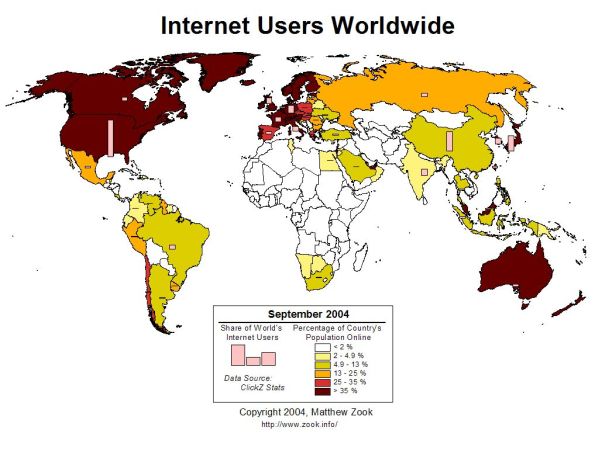
Internet users may before long have a secure solution to the modern plague of passwords.
HANOVER: Internet users may before long have a secure solution to the modern plague of passwords, in which they can use visual patterns or even their own body parts to identify themselves.
Developers at the world’s biggest high-tech fair, CeBIT, say that one of the biggest frustrations of having a smartphone and a computer is memorizing dozens of sufficiently airtight passwords for all their devices and accounts.
“The problem of passwords is that they are very weak, they are always getting hacked, and also from a user point of view, they are too complicated, everybody has 20, 30, 60 passwords,” said Steven Hope, managing director of Winfrasoft from Britain, the fair’s guest country this year.
“They all have to be different, no one can remember them, so everybody writes them down or resets them every time they log in. They don’t work in the real world today.”
Passwords have proliferated so much that it’s a daily struggle for users to cope with so many of them.
And as millions of internet users have learned the hard way, no password is safe when hackers can net them en masse from banks, email services, retailers or social media websites that fail to fully protect their servers.
Many simply throw in the towel and use no-brainer codes like “123456” and “password” – which are still the most common despite how easily they can be cracked, CeBIT spokesman Hartwig von Sass said at the event in the northern German city of Hanover.
In response to the vulnerabilities and hassles of the antiquated username-and-password formula, Winfrasoft has developed an alternative based on a four-colour grid with numbers inside that resembles a Sudoku puzzle.
Users select a pattern on the grid as their “password” and because the numbers inside the boxes change once per minute, the code changes too, making it far harder to hack.
“There is no way anybody could see which numbers you are looking at. You see typing numbers but you don’t know what the pattern is because each number is here six times,” Hope said during a demonstration.
Biometric data offers another alternative to seas of numbers, letters and symbols.
US giant Apple has already equipped its latest generation iPhone with a fingerprint reader to boost its security profile.
But a group of European hackers, the Hamburg-based Chaos Computer Club, demonstrated that the system could be pirated using a sophisticated “fake” fingerprint made of latex.
Japan’s Fujitsu turned to the other end of the hand and has developed an identification system based on each person’s unique vein pattern.
At its CeBIT stand, the company was showing off its PalmSecure technology on its new ultra-light laptop computer which has a small sensor built in.
Meanwhile Swiss firm KeyLemon has developed a face recognition system using a webcam.
The computer registers parts of the face, “the eyes, the eyebrows, the shape of your nose, your cheekbones, the chin…” a company spokesman said.
The person must then only sit in front of the screen to be recognised and gain access to the computer.
The system, already used by some three million people according to the company, still has a few kinks however so users must remember to take off their eyeglasses, for example, or have consistent lighting in order to pass the identity test.
“Face recognition and fingerprint recognition are additional safety security features, they will never have only face recognition or fingerprint recognition” but rather use them as a crucial backup to passwords, he said.
How to Hunt for a Job Using Social Media

Securing a job is the tough part, but scouting an open position? All it takes is a strategic scroll through your favorite social media accounts.
Sites like Twitter and Facebook can be fun and frivolous, but they’re also viable business opportunities. Plumbing through accounts, hashtags and personal pages could help launch next potential career.
Want to find a writing opportunity in a town near you? Just look up a hashtag on Twitter. Want to stay up to date with a company’s career openings? “Like” them on Facebook. Want to create a beautiful resume that’ll catch a recruiter’s or hiring manager’s eye? Head over to Pinterest.
Here’s how to land your perfect job via social media.
1. Twitter

In 140 characters or less, Twitter can help you find your dream gig. It’s teeming with job applications and professional networking pages, if you know where to find them.
a. Searches: Use that search bar to look for terms that apply to the job you want. For best results, type in words like “jobs,” “hiring” and other specifics that apply to your desired field and location; for example, “writer” and “New York City.”
b. Hashtags: Typing #jobs and #hiring will result in a plethora of tweets from those seeking employees. Employers who want to cast a wide net will often tweet out job applications, with accompanying hashtags.
c. Tweet often: Though it depends on your career of choice, tweeting is a great way to network with like-minded folks in your profession. Follow businesses and people you’re interested in and don’t be afraid to send them the occasional tweet. (On that note, make sure your Twitter account is polished and professional).
d. Follow away: There are dozens and dozens of Twitter accounts dedicated to posting job applications. Go to the search bar and type in “jobs,” then click “People” on the left-hand side. You’ll soon see all the Twitter accounts with “jobs” in the username and can gleefully press the “Follow” button.
2. Facebook
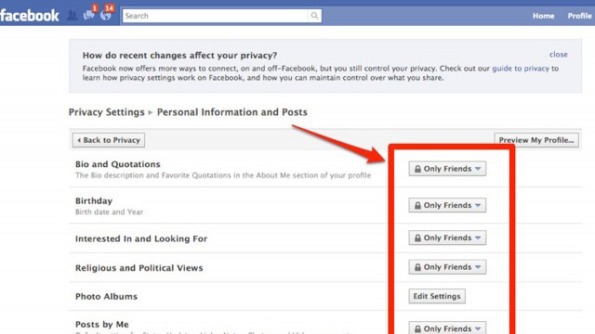
Facebook is an undeniable social media juggernaut. According to its representatives, these are the top tips for trying to get a job through Facebook:
a. “Like” some pages: Most companies strive for dynamic social media presences, and Facebook Pages are engagement 101. By “Liking” them, you can get daily updates about their activity. Plus, they will likely post links to available job applications.
b. Private/Public: Take a thorough look at your privacy settings on Facebook, and make sure you know exactly how others view your Timeline. However, you should consider setting your work and education info public, enabling others to see your professional history.
c. Stay updated: Make sure all of your work and education info is up to date and reflects your current position and past experience.
d. Add “Professional Skills:” A few months ago, Facebook added a “Professional Skills” portion to the “About” section. Underneath work and education, add skills you’ve acquired, optimizing your professional appeal.
3. LinkedIn
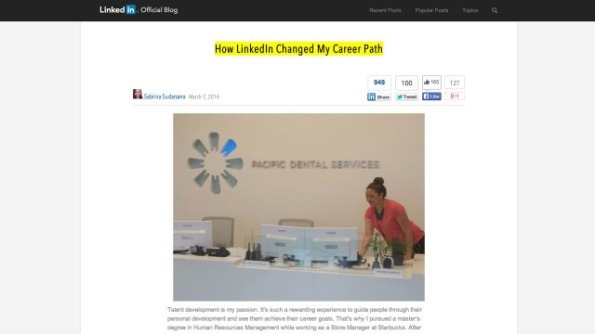
Perhaps the most obvious of job hunting sites, LinkedIn is the network of choice for professionals.
a. Connect: Unlike Facebook, it’s a little less creepy to connect with strangers on LinkedIn, because everyone there is looking for networking opportunities. Connect to people who have careers you’re interested in, and search around for those who might only be one degree away from you. For inspiration, check out the member stories portion of LinkedIn’s blog, where users share their success anecdotes about networking through the site.
b. Jobs Board: Not only does the site provide you with advice and connections, but it also has a jobs board highlighting available opportunities in nearly every field.
c. Endorsements and recommendations: There’s a portion of your profile dedicated to glowing recommendations and endorsements from your peers. Try to get as many as you can, and your page’s likability will instantly boost.
d. Share more: According to LinkedIn’s Career Expert, Nicole Williams, sharing articles or content with your network boosts your chances 10 times for getting contacted by a recruiter. When you share content, it proves your knowledge in the industry.
e. List all the things: Your profile is 12 times more likely to be viewed by a hiring manager if you have a detailed list of work experience, Williams says. The more robust your profile is, the more experienced and hirable you look.
4. Tumblr
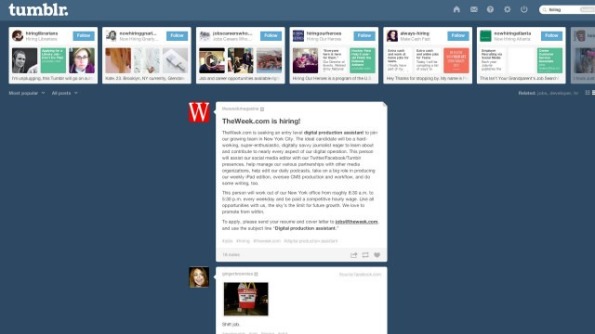
You can use Tumblr, that vast Internet playground of GIFs and rabid fandoms, for help in the job search.
a. Search tags: In the search bar, look for tagged terms like “hiring” and “jobs.” It’s a bit harder to separate the wheat from the chaff in the tag-happy blogging community, but you’ll still be able to find plenty of cool companies advertising open jobs via Tumblr.
b. Start Tumbling: This is especially important if you’re the creative type. A Tumblr account attuned to your interests, and full of your own original content, automatically ups your unique appeal to employers. In addition, a good Tumblr following can lead to job offers from employers who happened to stumble upon your site.
5. Pinterest

Yes, Pinterest is more than just a pretty place to find wedding inspiration and delicious recipes.
a. Pin your résumé: Tired of the standard, one-sheet format? Use a Pinterest board to “pin” your résumé. You can highlight certain aspects of your experience and add photos and links. See Rachael G. King, a social media manager at Sidecar who created a “living résumé.”
b. Follow these pages: For a never-ending well of job tips and opportunities, follow these seven helpful Pinterest boards.
How To Assess Your Performance Before Appraisals

What You Should Know About WordPress SEO
No doubt you understand how helpful WordPress is for a variety of applications, if you work as an Internet marketer or blogger.
It makes running a quality website possible for people with limited experience, and allows almost anybody to get whatever content they want onto the net. Perhaps the most substantial benefit that WordPress offers over other platforms is its ability to levy targeted, organic search traffic. Web site visitors prove to be the vital element for anyone’s website, and improving this function provides many advantages, allowing your SEO work to go smoother and better; this is WordPress’ specialty.
By utilizing the pre-existing features of your new WordPress installation, you can see a serious boost to your search engine visitors. This is far better than being desperate for the almighty search engines to throw traffic in your direction absent targeted instructions, which is what happens with your typical HTML site. The easy to use features WordPress incorporates into your site help you get the most targeted traffic out of Google and other popular search engines. In the following, we will consider the options for achieving a significant ranking for your WordPress blog, and what is involved in reaching this goal.
The first thing you need to focus on is the titles for your content. Google and other search sites look for keywords to prioritize findings, so the titles you use for each post must incorporate as many targeted keywords as possible. These relevant keywords should be in the title as well as your content. You have to be very clear when you’re communicating with the search engines, so don’t have your title repeated elsewhere on the site.
Instead, have a list of related keywords by your side so that you can use them when writing titles for your posts. As you are working, check your titles to be sure they attract readers and are not just a list of words for search engines. Your post title is the first thing anyone will see, so it has to be interesting. As long as you communicate a title that’s relevant and easy to understand, you can keep its length on the short side. Your site’s content is crucial for achieving high ranking in the search engines, so it not only has to be high quality; it has to be relevant in every way.
In particular, if you are not interested in indexing your blog, you should put up a sitemap to your WordPress site. Creating a oogle site mapG is easy with the use of a plugin. It is an easy, but important step to take to maximize your online presence. The site map guides search engines throughout your site to find and index all of the pages. Pinging is another vital action to take and should be done with each new post you place on your site. When other bloggers link back to your blog, you’ll get targeted backlinks, which ultimately helps in your ranking. Notifying (or “pinging”) other sites after every post is published is important.
Make sure to mention and link to older related posts when you add new content. This makes it even easier for readers to get from one post to another. To do this effectively, you can use a plugin which will list related posts under each new post. Additionally, the number of related posts can be changed; this will give the search engines a more efficient way to archive your content.
Bluetooth Paper Airplane Kit Is Ridiculously Cool
Flying paper airplanes has never been this fun. PowerUp Toys’ latest product lets you add a new element of interactivity to the old-fashioned paper airplane by attaching a battery-powered propeller and rudder, which can be controlled using an iPhone app via Bluetooth. The PowerUp 3.0 Smartphone Controlled Paper Airplane Kit, currently being funded via a Kickstarter campaign, is due to hit the market in May for $50.
The PowerUp 3.0 Smartphone Controlled Paper Airplane Kit is the company’s third generation of this device; previous models lacked an accompanying app. The way it works is pretty simple: First, fold a paper airplane using the template provided. Next, attach the PowerUp module to the plane, and pair it with your phone. Then, it’s off into the wild blue yonder!
Kit Adds Propeller Power to Paper Airplane
The battery inside the PowerUp 3.0 will provide about 10 minutes of flying time, and recharges via microUSB in about 15 minutes. The app itself is pretty ingenious. Would-be pilots steer the airplane by tilting the iPhone left or right, and a gimbal shows you how level the plane is relative to the horizon. A throttle in the middle lets you adjust the speed of the propeller, and three gauges show the power output, battery life remaining, and signal strength between the plane and your phone.
In our brief hands-on time, the plane was very zippy; it flew past us in the blink of an eye. PowerUp says you’ll be able to control the plane to a range of about 60 yards. When it’s released in May, we’re certainly looking forward to taking it for a flight or two.
Get more from LAPTOP
Top 10 Tech Trends of 2014
Sony Xperia Z1s Wows with 20-MP Camera
12 Gadgets Ahead of Their Time
This article originally appeared on LAPTOP, a TechMediaNetwork company. Copyright 2014, all rights reserved. This material may not be published, broadcast, rewritten or redistributed.
Marketers to Increase Digital Marketing Spend in 2014
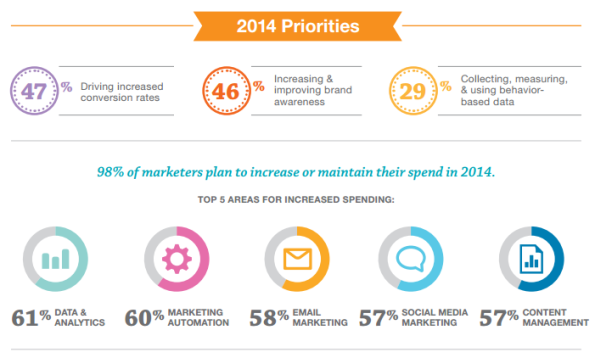
Most companies will be giving their digital marketing a boost in 2014, as new research from ExactTarget reveals that two thirds of marketers plan to increase their investments in digital marketing this year.
The study found that 61 percent of marketers plan to increase their investments in data and analytics, 60 percent plan to increase spend on marketing automation and 58 percent will spend more on email marketing. In addition, 57 percent of marketers say they will invest more in social media while another 57 percent will increase their investment in content management.
Additional insights from the ExactTarget study reveal that the top priority for marketers in 2014 is to increase conversion rates, followed by increasing and improving brand awareness and collecting, measuring and using behavior-based data.
“We are in the third wave of the Internet revolution where everything and everyone is connected; this is the Internet of Customers,” said Scott Dorsey, chief executive officer, ExactTarget Marketing Cloud. “As the number of connected devices and mobile phones continue to skyrocket, marketers are investing aggressively in digital to connect with their customers in entirely new ways across every channel and every device.”
Jilla: Trailer
In early 2013 when news of Vijay and Mohanlal coming together for the first time in Jilla was announced it created a huge frenzy among fans of both these popular actors. Considering that Vijay is also extremely popular in Kerala this sounded like a total winning combination. The people responsible for making this come true are writer-director R.T.Neason and producer R.B.Choudary. For the veteran R.B.Choudary, Jilla marks his 85th film as producer in 25 years of experience. R.T.Neason who had earlier directed the film Muruga (2007) had assisted Jayam Raja on Velayudham where he got the opportunity to work with Vijay earlier. Jilla is touted as a total mass Madurai based entertainer where apparently Mohanlal features as the father of Vijay. The rest of the star cast includes Kajal Aggarwal, Soori, Mahat Raghavendra, Niveda Thomas, Pradeep Rawat etc. D.Imman‘s music has already become popular and the film has Ganesh Rajavelu as DOP and Don Max as editor.
It is indeed strange that for a film of this magnitude the trailer has just been unveiled 2 days before the release of the film. Jilla is vying for Pongal honours along with Ajith’s Veeram and both these films will release on 10th January. The trailer lives up to the image being projected about the film though why Mohanlal doesn’t get any dialogue in the same is a big mystery. Lets see whether Jilla lives up to its hype. Here’s the trailer of the film
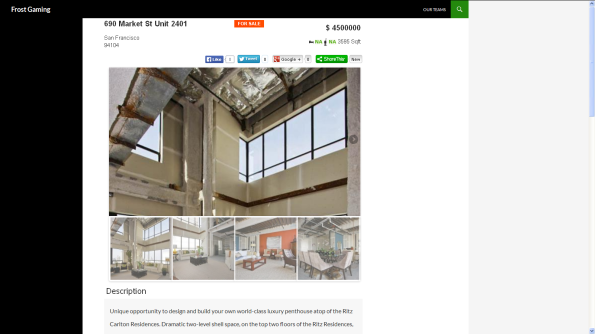
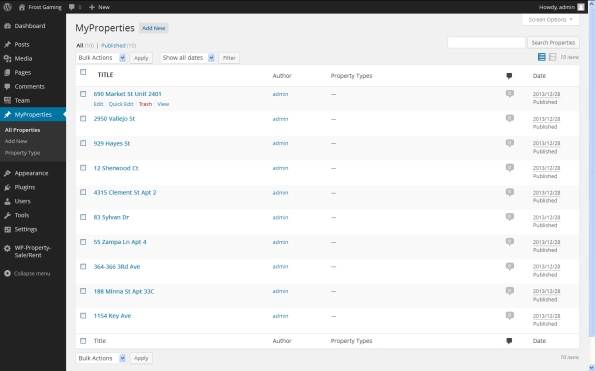
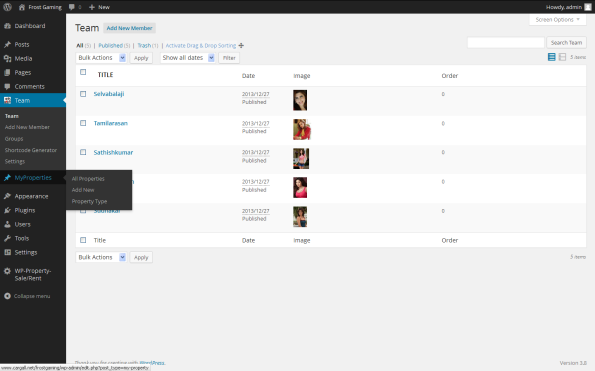
2014 – FIRST PLUGIN ” WP Property Sale/Rent “
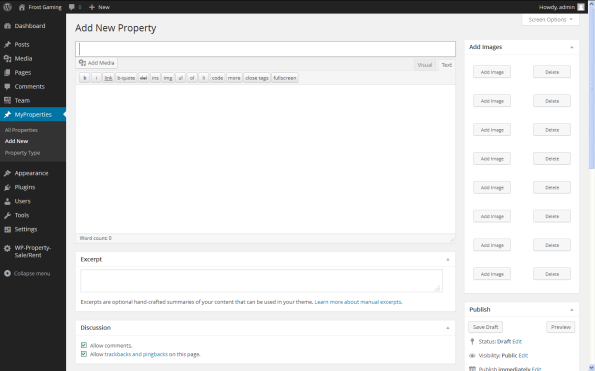
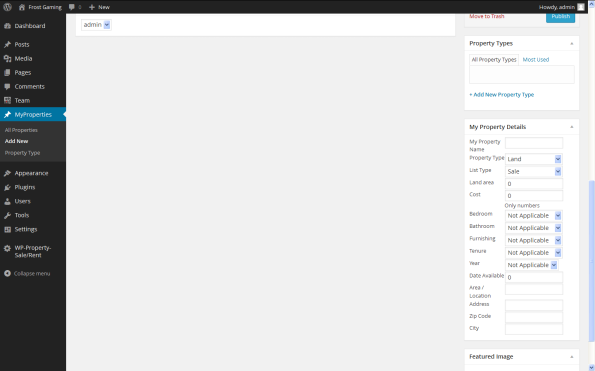
WP Property Sale/Rent for creating and managing real estate agents and people who are willing to list their property. https://selvabalaji.wordpress.com
Great options to list properties on your own WordPress website. WP Property Sale/Rent for creating and managing highly real estate agents and people who are willing to list their property listing on their own WordPress site.
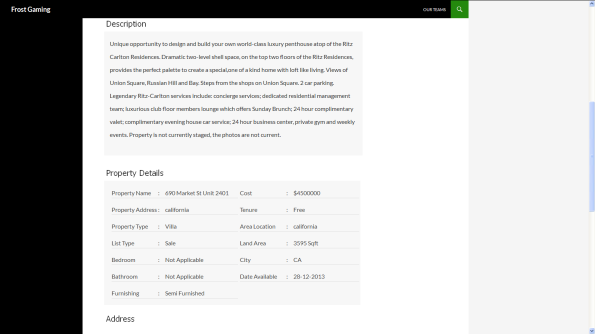
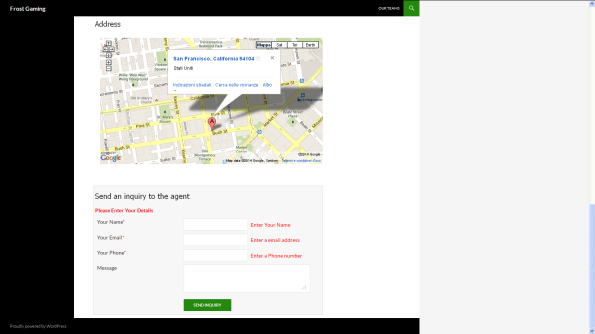
WP Property Sale/Rent is the WordPress plugin for creating and managing highly customization real estate, property management, and completely custom listings showcase websites. Turn your WordPress powered site into a real estate site. Create listings, upload images, display a dynamic map, slideshow, agent information,Google Maps, Send A Inquiry to agents Directly, Image slide show, and much more.
As always, integration is seamless, the system is expandable and customization, functionality is rich, and we are here to support it.

If you are looking to build a site where you can list property for sale or rent, this is the plugin you need.
Features
- Add Property
- Add multiple property photos
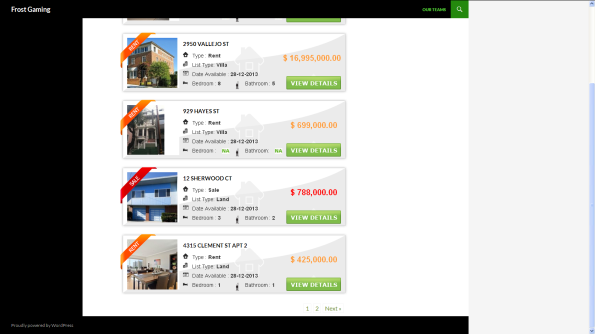
- Advanced property search
- jQuery slider in property detailed view
- property options so you can add any type of property listing
- multiple categories
- Property search widget.
- Advanced search widget and custom page.
- Custom property listing page
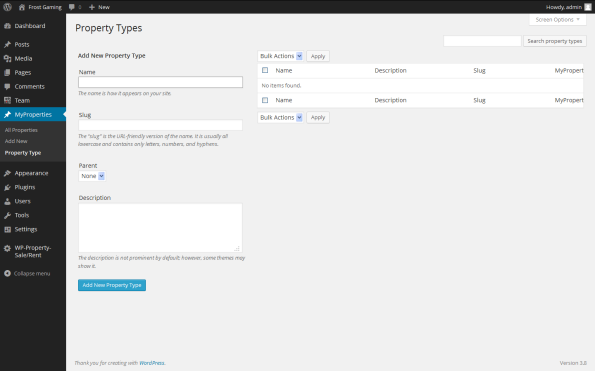
- Custom manage-able property types
- Manage the number of property listing per page
Advanced property search page
- Create a normal page in your wordpress website
- Editor of the page, add this short code [PROPERTY_ADVANCED_SEARCH]

Welcome New Year 2014
Hello Guys,

Wishes to everyone who online on this post.
Wish you all the best to you and your family for your bright future.
This year may come the biggest joy and joy so that you can’t explain that.
You all are invited here to wish Happy New Year 2014 each other.
You can easily wish each other just commenting below.
You have a big opportunity to start the new work today, you can enjoy yourself and motivate yourself by opting the following positive lines: –
Say to yourself every morning:
-Today is going to be a great day!
-I can handle more than I think I can!
-Things don’t get better by worrying about them!
-I can be satisfied if I try to do my best!
-There is always something to be happy about!
-I’m going to make someone happy today!
-It’s not good to be down!
-We always have an option!
-Life is great, make the most of it!
BE AN Optimist!
Best Wishes to all
Balt (selvabalaji)
Ajax WordPress Login
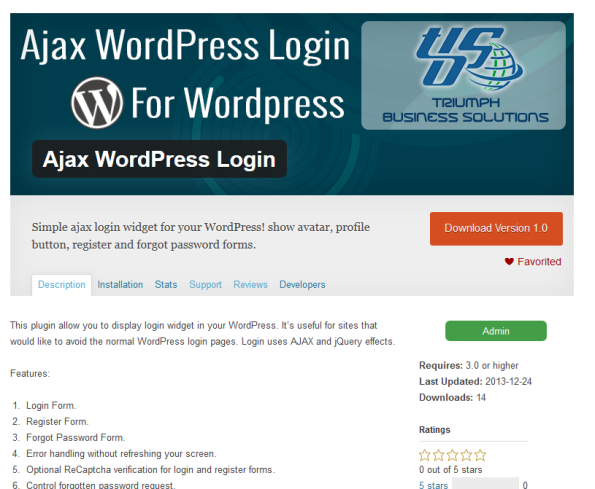
We are happy to release “Ajax WordPress Login” a new WordPress This plugin allow you to display login widget in your WordPress. It’s useful for sites that would like to avoid the normal WordPress login pages. Login uses AJAX and jQuery effects.
http://wordpress.org/plugins/wp-ajax-login/
Features:
- Login Form.
- Register Form.
- Forgot Password Form.
- Error handling without refreshing your screen.
- Optional ReCaptcha verification for login and register forms.
- Control forgotten password request.
- Work with forced SSL logins.
- Specific option to show link to profile page and dashboard.
- Customizable redirect URL after log in or log out.
- Option to show or hide avatar and change it size.
- It’s responsive!

Why do we celebrate Christmas on December 25?
December 25 is the traditional anniversary of the birth of Christ, but most scholars are unsure about the true date for Christ’s birth.
The decision to celebrate Christmas on December 25 was made sometime during the fourth century by church bishops in Rome. They had a specific reason for doing so.
Having turned long ago from worshiping the one true God and creator of all things, many early cultures in the Roman empire had fallen into sun worship. Recognizing their dependence on the sun’s yearly course in the heavens, they held feasts around the winter solstice in December when the days are shortest. As part of their festivals, they built bonfires to give the sun god strength and bring him back to life again. When it became apparent that the days were growing longer, there would be great rejoicing.
The church leaders in Rome decided to celebrate Christ’s birth during the winter solstice in an attempt to Christianize these popular pagan celebrations. For the most part their efforts failed to make the people conform, and the heathen festivities continued. Today we find ourselves left with a bizarre marriage of pagan and Christian elements that characterizes our modern celebration of Christmas.
Regardless of the pagan background of so many December traditions, and whether or not Jesus was born on December 25th, our goal is still to turn the eyes of all men upon the true Creator and Christ of Christmas. The light of the world has come. And the Christmas season and celebration presents the church with a wonderful opportunity to preach the good news–that men can be made righteous and have peace with God through faith in His Son, Jesus Christ.
Subscribe Via Email

Agaram Foundation

29,Vijay Enclave Krishna Street,
T.Nagar, Chennai - 600 017
Tamil Nadu, India.
Telephone : +91 44 4350 6361
Mobile : +91 98418 91000
Email : info@agaram.in
Site Info


 SELVABALAJI NEWS
- An error has occurred; the feed is probably down. Try again later.
Vistor Location
Unknown Feed
- An error has occurred; the feed is probably down. Try again later.
Unknown Feed
- An error has occurred; the feed is probably down. Try again later.
Unknown Feed
- An error has occurred; the feed is probably down. Try again later.
LeadSquared
- Into the Unknown: Embracing a Bold, Student-First Strategy for Enrollment Success
- Top 10 Sales Gamification Tools For 2024
- Top 9 CRMNext Alternatives in 2024
- Closing the Deal: 6 Surefire Strategies to Exceed Your Sales Targets
- Sales Automation 101:Unclog your Sales Pipeline
- KRA of Sales Manager and How to Track Performance
- Top 10 Healthcare CRM in the United States
- Why Do 70% of Online Inquiries Drop Off?
- Top 6 Paramantra Alternatives for Real-Estate Businesses in 2024
- Top 10 Spotio Alternatives for Field Reps
singershalini
- Untitled
- Pop Shalini Verified #Spotify Artist Playlist
- Pop Shalini's Interesting reads #Murakami
- Pop Shalini performs for Harris Jeyraj's concert with Benny Dayal and Haricharan
- Pop Shalini sings Vandhe Mataram
- Pop Shalini Sings her famous song Mudhal Naal Indru - Unaale Unaale
- Pop Shalini wishes Superstar RajiniKanth on the Dada Saheb Phalke Award
- A song for a Rainy day from my first album #Shalini - Chinna Chinna Mazhai thooral
- ipopshalini Verified Artiste sings Ranjha from Shershaah
- Chennai Floods
Flickr Photos


Advertsiment


 S e L v A B a L a J e E
Recent Comments